Enter your pay, bills, debts, and goals once. Paycheck Planner shows which bills each check covers, what’s left over, and your plan months ahead — before the money lands.
Free for 7 days, then $5.99/mo or $49.99/yr. Runs in your browser — nothing to download.
No bank login, everData stays on your deviceNo ads
paycheckplanner.pages.dev
Until payday · Fri, Nov 6
$265 left on this check
Bills covered
Rent · half, due Nov 1$575
Car payment · due Oct 28$340
Electric, phone & groceries · this period$585
Store card minimum · 24.99% APR$35
Set aside · held for the next check’s bills$50
To savings$80
Extra debt$106
Free to spend$80
Paycheck in $1,850 · biweeklyStore card at $0 by Dec 2026
0
months of plan ahead, per check
0
bank logins or connections needed
0
payoff orders compared — snowball & avalanche
0
days free before the first charge
Paycheck PlanUntil-Payday DashboardCompare Before You BuyPay Later CheckInsightsMonthly & Yearly ViewsSnowball & AvalancheNo Bank LoginRuns in Your Browser
Paycheck PlanUntil-Payday DashboardCompare Before You BuyPay Later CheckInsightsMonthly & Yearly ViewsSnowball & AvalancheNo Bank LoginRuns in Your Browser
What it does
Built around the check, not the month
Most budgets ask what a month looks like. Paycheck Planner asks the question you actually have on payday: what does this check have to cover, and what’s left when it does?
Paycheck Plan
One row per paycheck: the bills it covers, what’s set aside, and the leftover — projected months ahead.
Until-Payday Dashboard
The first screen answers one thing: after scheduled bills, here’s what’s left until the next payday.
Per-Paycheck Budget
Spending lines that live inside each check — groceries, gas, the everyday stuff — not a separate monthly guess.
Compare Before You Buy
Price a purchase against the actual check it would land on — cash vs. pay-in-4 — before you spend.
Pay Later Check
See exactly which upcoming checks a pay-later plan touches, and what each one looks like after.
Insights
The plan flags its own numbers: your highest-rate debt, tight checks ahead, when a balance reaches zero.
Debt Payoff Order
Snowball or avalanche — compare payoff orders side by side, with the month each debt reaches $0.
Monthly & Yearly Views
The same plan rolled up by month and year, with bonus-paycheck months marked when they land.
Past Paychecks
Closed-out checks with planned vs. actual, so you can see where the plan held and where it changed.
Setup, up top
Income, bills, debts, settings, AI coach, and data — now first in the sidebar, not buried at the bottom.
Premium
Everything in Base, plus
The Premium tier adds the vaults, the autopilot, investing basics, and household sharing — on top of the full Base planner.
Receipts & vault
Receipts tracked in a vault tied to your plan.
Insurance & vault
Insurance policies tracked alongside the plan.
Warranties
Warranties and their documents in one place.
Paycheck autopilot
The plan handles its own routine each check.
Investing basics
General investing education with hypothetical illustrations — not advice.
Papers
Tax set-aside and important papers in one screen.
Household sharing
Share the plan with the people it covers.
Investing basics is general education only — hypothetical illustrations with a labeled assumed rate, not financial advice.
Private by designNo bank login or connectionNo adsYour data stays on your deviceOptional encrypted syncOptional AI coach, with your own AI account
See it in action
See the product in action
Paycheck Planner — Base and Premium — with the same sample plan: $1,850 biweekly pay, five bills, one store card. Step through every screen below, then try the full click-through demo.
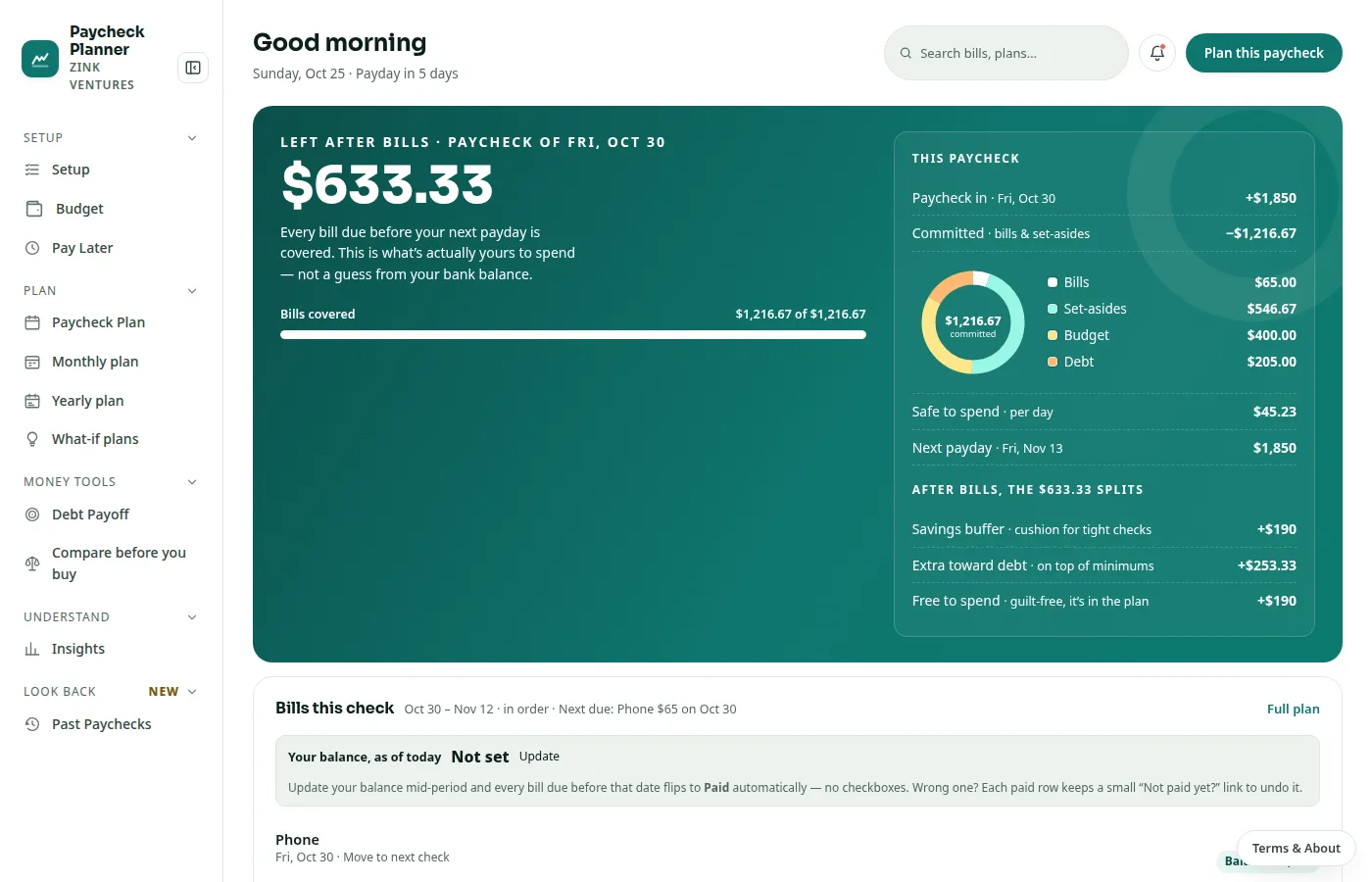
Home: $633.33 left after bills on the $1,850 check — $1,216.67 committed, $45.23 a day to spend.
1 / 12
Sample screens · sample data from the demo plan.
Prefer to click?
The full click-through demo runs the same plan in your browser — no signup, nothing installed.
Every bill on this check is covered, with $265 to place: $80 savings · $106 extra debt · $80 free.
Full walkthrough — Base, then Premium
110 seconds, narrated, recorded live in the app with the sample plan.
All figures on this page are the sample numbers from the demo plan. Your plan runs on the numbers you enter.
Base & Premium
Two tiers, one plan
Base covers the core planner. Premium adds the vaults, the autopilot, investing basics, and household sharing — on top of everything in Base.
Base
The core planner — everything you need to run a paycheck plan.
Home with the stick-to-your-plan projection
Paycheck Plan with the per-check budget inside
Pay Later checks
Debt payoff orders
Compare before you buy
Monthly & Yearly Plans
Insights
Past Paychecks with close-out
Setup (Income, Bills, Debts, Settings, AI coach, Data)
Budget for each paycheck
What-if plans
Premium
Everything in Base, plus:
Receipts & vault
Insurance & vault
Warranties
Paycheck autopilot
Investing basics
Papers
Household sharing
Investing basics is general education only — hypothetical illustrations with a labeled assumed rate, not financial advice.
Ty Zink
Founder · Zink Ventures
One person builds it, answers for it, and ships the updates.
Built by Ty
Built by the person who plans this way
Paycheck Planner isn’t a bank’s side project. It’s built and maintained by Ty Zink of Zink Ventures — a planning tool made for people whose money arrives one check at a time and has to be told where to go before payday, not after.
That’s why there’s no bank login, no ads, and no feed of offers: you enter your numbers, the plan runs on your device, and the only thing it tries to sell you is a clearer next payday.
Paycheck Planner is in its early stages and gets frequent updates — buying in now means the tool keeps growing around how people actually use it.
Pricing
Base and Premium
Base covers the full planner. Premium adds Track, Plan ahead, Money, and Vault & sharing on top of everything in Base. Both bill monthly or yearly, start with a 7-day free trial, and cancel anytime in Whop.
Free for 7 days, then $5.99/month plus applicable tax, charged automatically when your trial ends and every month after until you cancel. Cancel anytime in Whop (Profile > Orders > Cancel membership) or by emailing zinkventures.biz@gmail.com. Cancel before the trial ends and you pay nothing.
Free for 7 days, then $49.99/year plus applicable tax, charged automatically when your trial ends and every year after until you cancel. After the trial, your plan renews automatically until you cancel. Cancel anytime in Whop (Profile > Orders > Cancel membership) or by emailing zinkventures.biz@gmail.com. Cancel before the trial ends and you pay nothing. No refunds for unused time.
Premium (upgrade)
Everything in Base, plus
$9.99 /monthor$89.99 /year
7 days free first · then monthly or yearly
Track
Plan ahead
Money
Vault & sharing
Upgrading from Base? Your Base membership is cancelled and the unused part refunded within 2 business days.
How starting works: subscribe on Whop, get your product key, open Paycheck Planner in your browser and activate. No download, no bank connection, nothing installed.
7-day free trial: cancel before it ends and you won’t be charged. After that, plans renew automatically (monthly or yearly) until you cancel, and you keep access through the end of the period you’ve paid for. Payments are non-refundable, including partial months or unused time on yearly plans, unless the app is defective or not as described. In that case, email zinkventures.biz@gmail.com within 14 days of the charge. Your legal rights (including EU/UK withdrawal rights) are not affected.
Launch offer: the first 1,000 members get affiliate access — share your link and earn 20% commission on paid subscriptions you refer. No income is promised; you earn only when your referrals actually pay. Read the affiliate terms
Questions
Straight answers
It’s in its early stages and is currently getting daily/semi-daily updates. The core planner is fully working today, improvements land frequently, and members always get the latest version automatically.
No. It’s an educational budgeting and planning tool. It isn’t financial, tax or legal advice. Every date, chart and projection is an estimate based only on the numbers you enter.
You’ll need a Whop account to subscribe, but the app itself has no logins. Your budget data stays on your device unless you turn on device sync or the AI coach.
No. You enter your own pay dates, bills, debts and savings goals.
It runs in your web browser on your phone or computer. Optional encrypted sync keeps your plan on all your devices, locked with a passphrase only you know.
An active Whop plan gives you access to the app and its updates while your plan is active. Export is always available, so you can download a report or back up your data anytime.
Every new subscription starts with a 7-day free trial. Cancel before it ends and you won’t be charged. After the trial, your plan renews automatically every month or every year until you cancel.
In Whop, go to Profile > Orders > Cancel membership, or email zinkventures.biz@gmail.com. You keep access through the end of the period you’ve paid for.
See the Refund & Cancellation Policy on this page. In short: payments are non-refundable, including partial months or unused time, unless the app is defective or not as described — then email us within 14 days of the charge.
The AI coach is optional and off unless you connect it. It uses your own account with an AI service you choose, and that service may charge its own fees under its own terms.
Yes. You can download a report or back up your data anytime.